System integration
Daily briefing and alerting platform
Scheduled jobs pull from a dozen sources into one briefing on my phone and a bedside display, and alert me when anything breaks. It has run for months without my stepping in.
The problem
The information I check every day lives in about a dozen apps and accounts that don't connect to each other, and I didn't want to open each one several times a day.
The harder part was making it reliable enough to run unattended for months, and safe enough to read my mail and finances with no way to change them.
What it does
Every two hours during the day, a job on my Mac builds a briefing with the weather, my calendar, my cash balance, open reminders, and a sorted summary of new mail. It publishes the briefing to a password-protected page that lives on my phone's home screen. The same server feeds the bedside display, so the calendar and weather also show up on the nightstand.
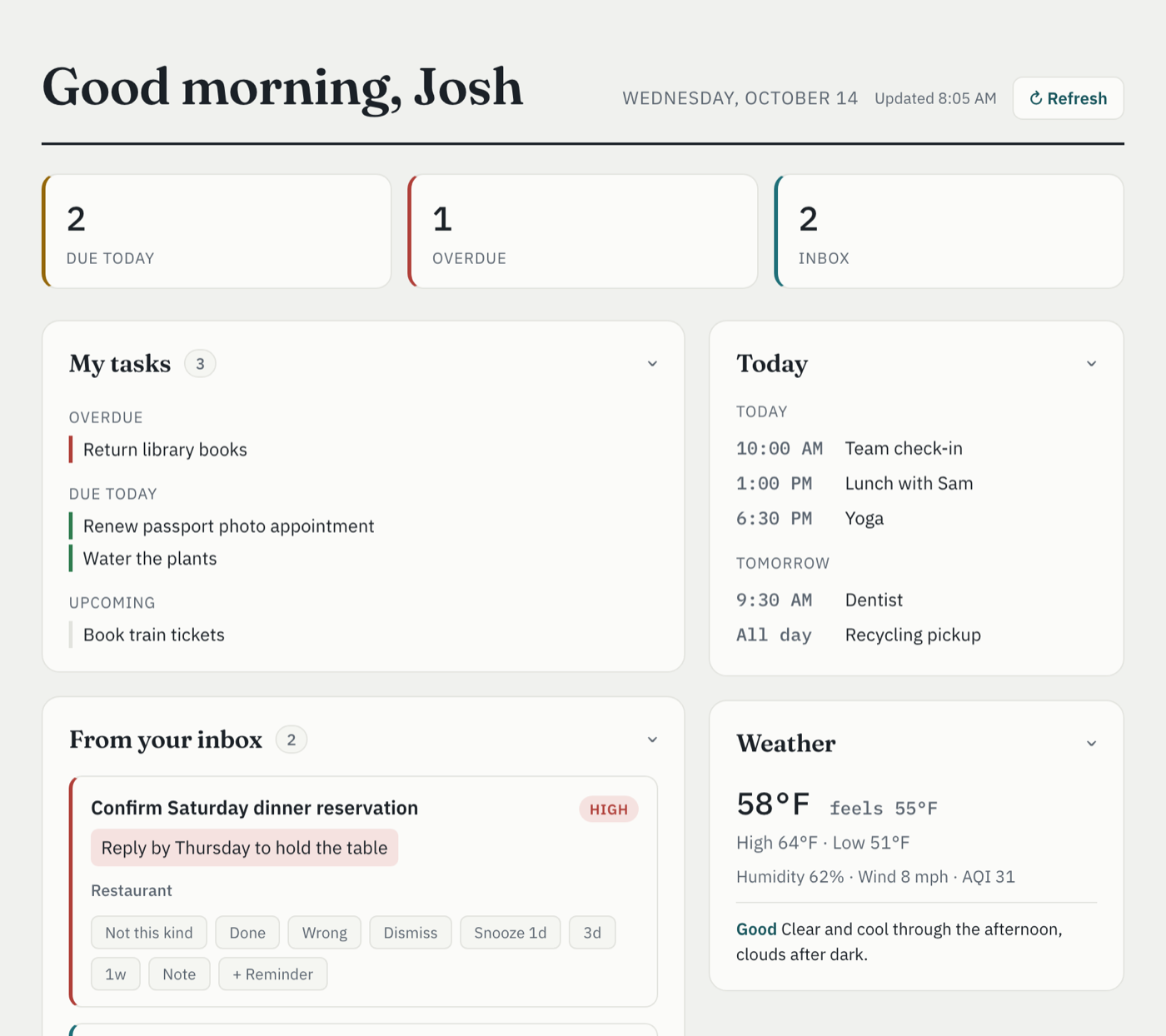
Where the data comes from
- Gmail, through a command-line tool I wrote that reads message headers only and has no way to label, archive, delete, or send.
- Google Calendar through the official API on a read-only scope, and an Outlook calendar through a published sheet export.
- Apple Reminders through a small Swift helper compiled against EventKit, because there is no API and AppleScript cannot see enough.
- My cash balance from a budgeting app with no public API, through an open-source client I restricted to reading.
- Weather and air quality, my fantasy baseball league, and, in a separate job, my last.fm plays and reading list.
Where it goes
- A private dashboard on my phone. The Mac can upload new briefings to it and do nothing else.
- The bedside OLED display, which reads calendar, weather, subway arrivals, and lights from the same server.
- Google Calendar, where a weekly job writes upcoming releases from the people I follow as all-day events.
- Apple Reminders, through a second compiled CLI that can set repeat rules, which AppleScript cannot.
- macOS notifications, through one shared notification path that every scheduled job calls.
- Email, sent from me to me by the monitoring job when a deployed service raises a new alert signal.
Architecture
Sources → shared read-only plumbing → ten scheduled jobs on the Mac and one service on the server → six surfaces. A monitoring layer probes the server, the tokens, and the jobs themselves, and pages back through the same notification path.
Safeguards
Most of the engineering went into the parts that fail quietly.
Staying signed in
- The finance app's saved login expires without warning. When a request fails because of the login, the script signs in again with a one-time code. A network error gets reported instead, so it can't set off a login attempt.
- The open-source client shipped with HTTPS certificate checks turned off, and I turned them on before giving it a password.
- Google makes me re-approve mail access about once a week. An hourly job checks both accounts and reminds me until I do.
Catching failures
- A server-side timer probes each deployed service every five minutes, and a Mac-side probe checks the same endpoints from outside. A check has to fail twice in a row before I get an alert.
- A morning job alerts me to any job that didn't run overnight.
- Alerts never wait for me to dismiss them. The tool they replaced did, and two stuck alerts used up enough memory to crash the Mac.
Limiting what can change
- Sources that limit how often they can be called are fetched once a day.
- I test each project in proportion to the damage it could do. Anything that can send mail or touch money has tests proving it defaults to a dry run and refuses unsafe requests. The briefing pipeline has 433 tests.
The feedback loop
Mail triage is the only step that uses a language model, with one call to a small model per refresh. Buttons on the dashboard let me rate each suggestion, and a text box takes anything else. Marking a message as the wrong kind mutes that sender or topic for ninety days. Each week a job gathers my notes into a review, and I turn the ones worth keeping into standing rules for the model.
How I built it with AI
This is integration work across systems that were new to me, built with coding agents: EventKit and Swift for the Reminders helper, launchd for scheduling, systemd and nginx on the server, an undocumented GraphQL schema for the finance app. I brought the operations discipline. I decided which system is the source of truth for each kind of data and which paths may write to it, tested the safety checks before the screens, and kept an inventory of everything deployed. The most useful decision was writing four small Google command-line tools instead of relying on the AI tools' built-in connectors, which work for a quick lookup but not for scheduled jobs.